What the warning is actually checking
Orca Slicer stops the slice when a validation step decides that an extrusion width in the active profile cannot work with the current layer height. In a report against OrcaSlicer 2.4.0-dev with a Bambu Lab X2D 0.2 mm nozzle, the reporter's debug notes point at Print::validate() failing when the minimum extrusion width is at or below the layer height for keys such as line_width and inner_wall_line_width; the CLI exited with code 205 and "Too small line width" while the same model and 0.2 mm process preset sliced normally in the GUI (issue #13746).
The message does not always name the field. Another report on OrcaSlicer 2.3.2 named it directly: "line width too small (skin_infill_line_width)" (issue #13685). When a variable name appears, that is your fastest lead.
Four values that look alike
Value | Where it comes from | Why it can trigger the warning |
|---|---|---|
Nozzle diameter | Printer and extruder settings | Sets what 100% means for a percentage width, but it is not the value the check compares |
Extrusion line width | Line-width settings, per line type | A fixed millimeter value or a percentage of the nozzle; a fixed value can end up at or below the layer height |
Layer height | Process and profile settings | The reported check compares the minimum effective extrusion width against it |
Imported profile or object values | Printer, process, filament, and imported project presets | They supply the effective widths, and a nozzle change can leave stale per-type values behind |
The official wiki documents line width as a float or a percentage, with separate fields for first layer, outer wall, inner wall, top surface, sparse infill, internal solid infill, support, and bridge, plus a default value used when a line type is set to 0 (Line Width, OrcaSlicer Wiki). A profile can therefore fail while the general line_width looks reasonable, because the failing value may sit in a line-type field you never edited.
A diagnostic matrix for "which field failed"
What you see | What it usually means | What to check next |
|---|---|---|
The message names a variable, such as | That field is the best first lead | Compare that width with the active nozzle, layer height and the official preset for your printer; change one value only after you understand the mismatch |
You changed nozzle size or printer recently | Fixed millimeter widths do not follow a new nozzle; only percentages scale | Compare every per-type width with the new nozzle diameter, then update the values or switch to percentages |
The failure appeared after a layer-height change | Validation compares the smallest effective width with the layer height | Check the lowest width across all line types, not just the default |
GUI slicing works, CLI slicing fails | Preset loading and merging can change the effective widths | Slice from the GUI or a GUI-exported project, and verify the preset the CLI built |
A feature you barely use seems to block the slice | Width fields can be validated for line types a model only touches in a few patterns | Find and set the named field instead of disabling the feature |
Finding and fixing it, step by step
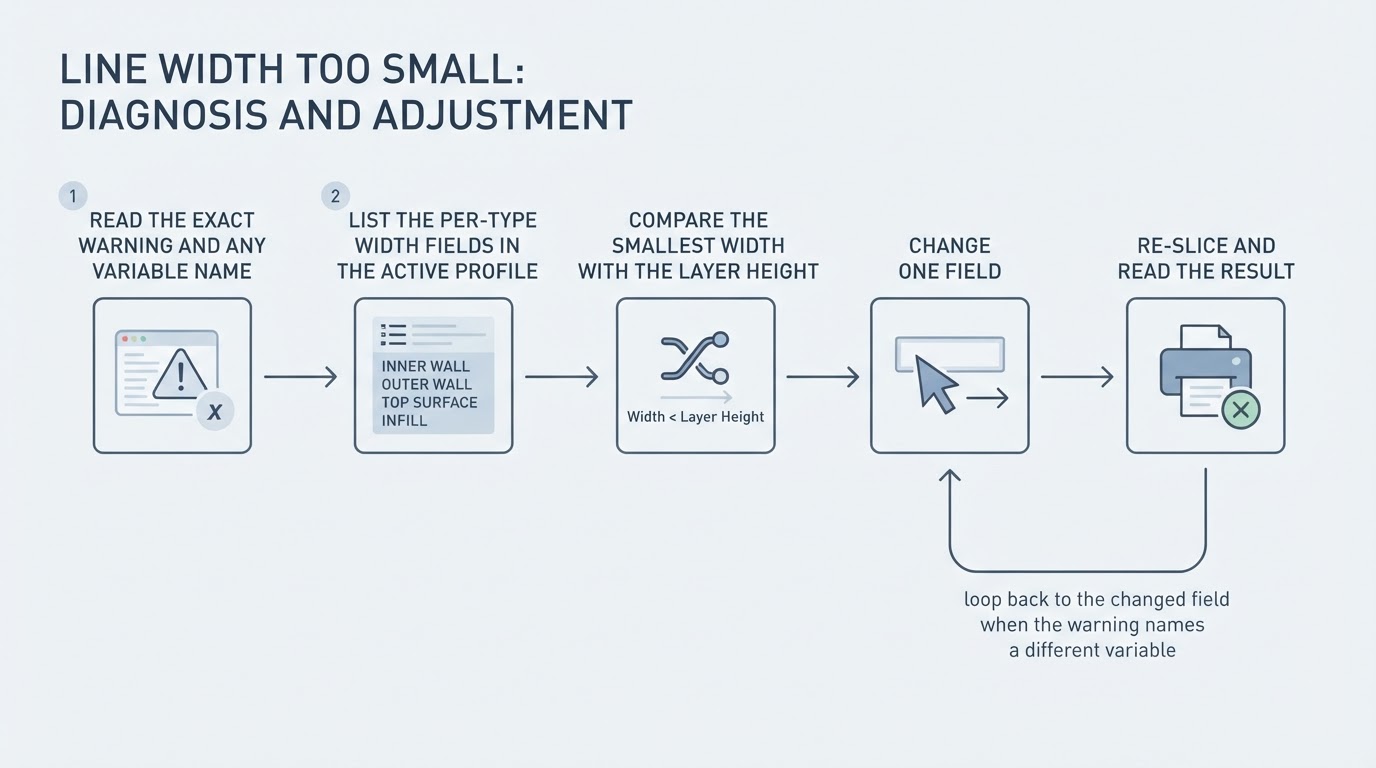
- Copy the exact message, including any variable name in parentheses. That name identifies one real field to check.
- Save or duplicate the active profile first, so you can return to a known-good state.
- List every width field in the preset: default (
line_width), first layer, outer wall, inner wall, top surface, sparse infill, internal solid infill, support, bridge, and any skin or skeleton infill widths. Note each unit and any line type set to0, which falls back to the default value. - Compare the smallest width you found with the layer height and nozzle diameter, using the official preset for that printer as a reference. The wiki's percentage examples are guidance, not universal safe values for every line type.
- Isolate one affected object, change one field, and re-slice.
- Completion standard: the slice finishes without the warning, and the Preview shows a continuous, connected extrusion path for the line type you changed. If the warning returns with a different variable name, repeat the loop for that field.
What not to do
- Do not raise every width at once. The wiki's over-extrusion note applies above 150%, and a shotgun change hides which field mattered.
- Do not skip or disable validation. The reported builds rejected some width/layer-height combinations; use the warning to find the bad profile value rather than forcing a print.
- Do not treat one percentage as a universal answer. Bridge width, for example, cannot exceed the nozzle diameter according to the wiki.
Limits of this diagnosis
- The issue reports come from specific builds, 2.3.2 and 2.4.0-dev, on specific machines; a later release may change the message or which fields are validated.
- The message may not name a setting in every build, and clicking it may not take you to the field that failed.
- Percentage fields scale with the nozzle, but fixed millimeter fields and values merged from several presets can carry old numbers, so the sources here describe how the warning is produced rather than which width is right for your material and printer.
FAQ
Does "line width too small" mean my nozzle is too small?
Not necessarily. The nozzle diameter is the reference for percentage widths, while the reported check in the cited builds also involved effective widths and layer height. A smaller nozzle needs a matching printer and process profile; even a larger nozzle can fail if a per-type width is stale.
Why did this start after I switched to a 0.2 mm nozzle?
Because the profile's per-type widths may still hold values from the old nozzle. Percentages scale automatically; fixed millimeter widths do not. In issue #13685, setting the extruder diameter to 0.2 mm and the general widths to 100-110% still produced the error until the skin and skeleton infill widths were set explicitly. Bambu Lab 0.2 mm presets have failed the same way on the command-line path while the GUI worked (#13746).
Can I just raise the line width until the warning goes away?
Only change the field that is actually failing, one value at a time, and re-slice between changes. Raising everything hides the cause and can push widths into an unsuitable range. If the GUI slices while the CLI fails, compare the exact resolved presets and version before assuming the model or nozzle is the cause.
For related profile settings, see our Orca Slicer speed-settings guide; speed is not a substitute for correcting the width error.