The short answer
If you run one Bambu Lab printer and want the least setup, Bambu Studio is the practical default. If you run a mixed-brand bench, a Klipper machine such as a Voron, or you want to tune flow, pressure advance and max volumetric speed per filament, Orca Slicer is the better fit.
We are not the official OrcaSlicer project, we do not host the installer, and we have an interest in Orca Slicer rather than neutrality between the two tools.
Key answers at a glance
- Which slicer is deeper for tuning? Orca Slicer, by the documented calibration and settings surface.
- Which is easier to start with? Bambu Studio, on a Bambu Lab printer.
- Which supports more printer brands? Orca Slicer, with preloaded profiles for Bambu Lab, Prusa, Creality, Voron, RatRig, Anycubic, Elegoo, Sovol, Qidi, Snapmaker and generic Klipper or Marlin machines.
- Which works without the cloud? Orca Slicer, whose Stealth Mode is documented as zero outbound calls to Bambu servers.
- Which should a mixed-brand shop standardize on? Orca Slicer, one install for the whole fleet.
- Which is the lowest-effort default? Bambu Studio on a Bambu Lab printer.
Key differences that change your workflow
What decides most switches is not the interface; it is how much machine and material setup each slicer hands to you and how much you have to build yourself.
Orca Slicer exposes more of the parameter surface. The documented comparison puts it at roughly 30% more visible options at any given depth than Bambu Studio, organized into Simple, Advanced and Developer visibility tiers, with a single-window flow from the Printer, Filament and Process preset triple through arrange, slice and Preview.
Bambu Studio's tooling is narrower and stays inside Bambu Lab's own ecosystem: two calibration tests limited to Bambu Lab printers, and the vendor-managed workflow that Orca Slicer is measured against here.
That is why calibration tooling and printer coverage are the two areas where the gap shows up first.
Calibration and testing tools
Orca Slicer's documented calibration menu holds eight guided tests: Temperature Tower, Flow Ratio, Pressure Advance, Retraction, Max Volumetric Speed, Cornering / Junction Deviation, a six-hole Tolerance Test and VFA / Input Shaping. The same documented comparison puts Bambu Studio at two, both limited to Bambu Lab printers, so a mixed-brand bench cannot use Bambu's pair everywhere.
What makes the menu matter is where the numbers land. Test results are written back into the filament or printer profile: the flow wizard writes the Flow Ratio straight into the filament preset, and Pressure Advance is stored per filament, so tuned values follow the spool across printers and AMS slots instead of living in a notebook or a spreadsheet.
The site publishes a recommended order: Temperature Tower, then Flow, then Pressure Advance, then Retraction, then Max Volumetric Speed.
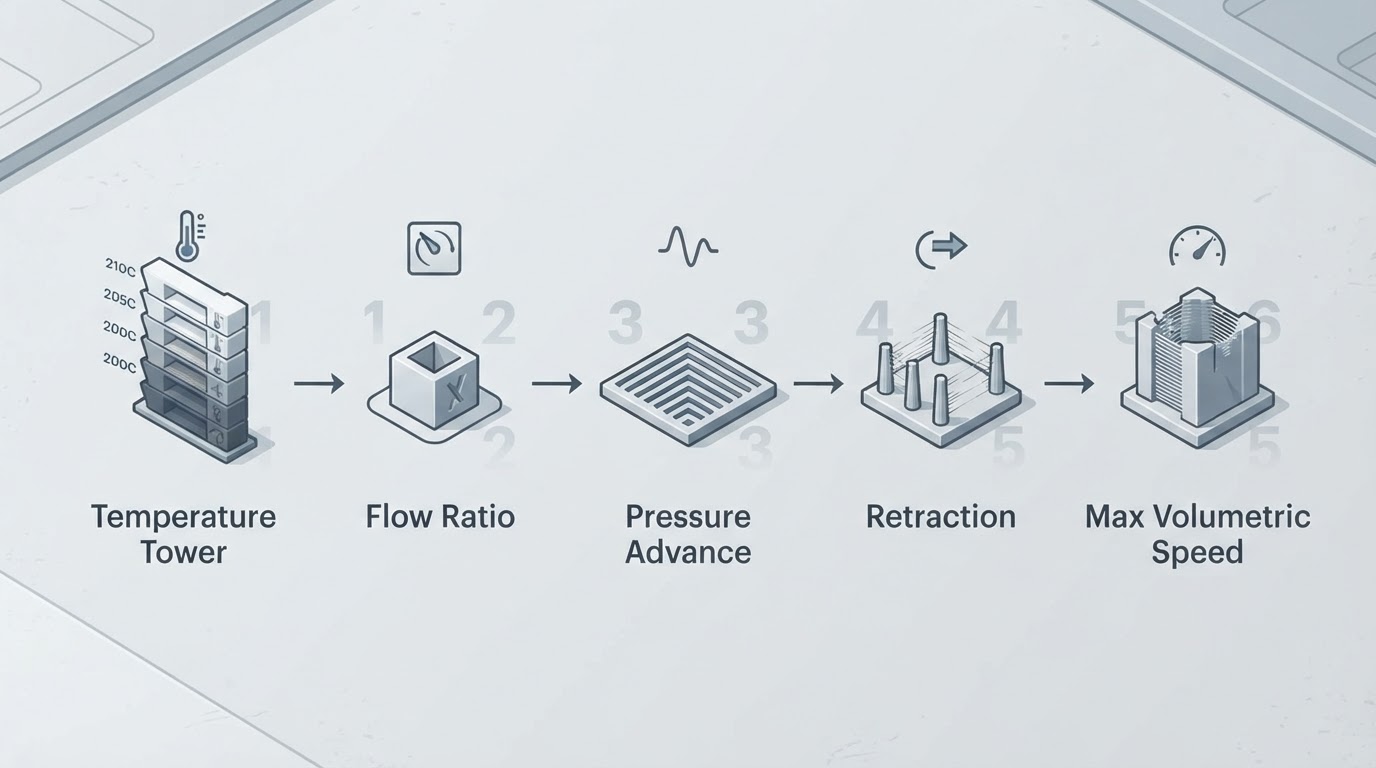
Read the counts as documented rather than benchmarked. The comparison comes from the guide material behind this site, the tooling is release-sensitive, and version 2.4.2 is the documented current stable release, so verify the details against the builds you actually have installed.
Printer-brand support and profiles
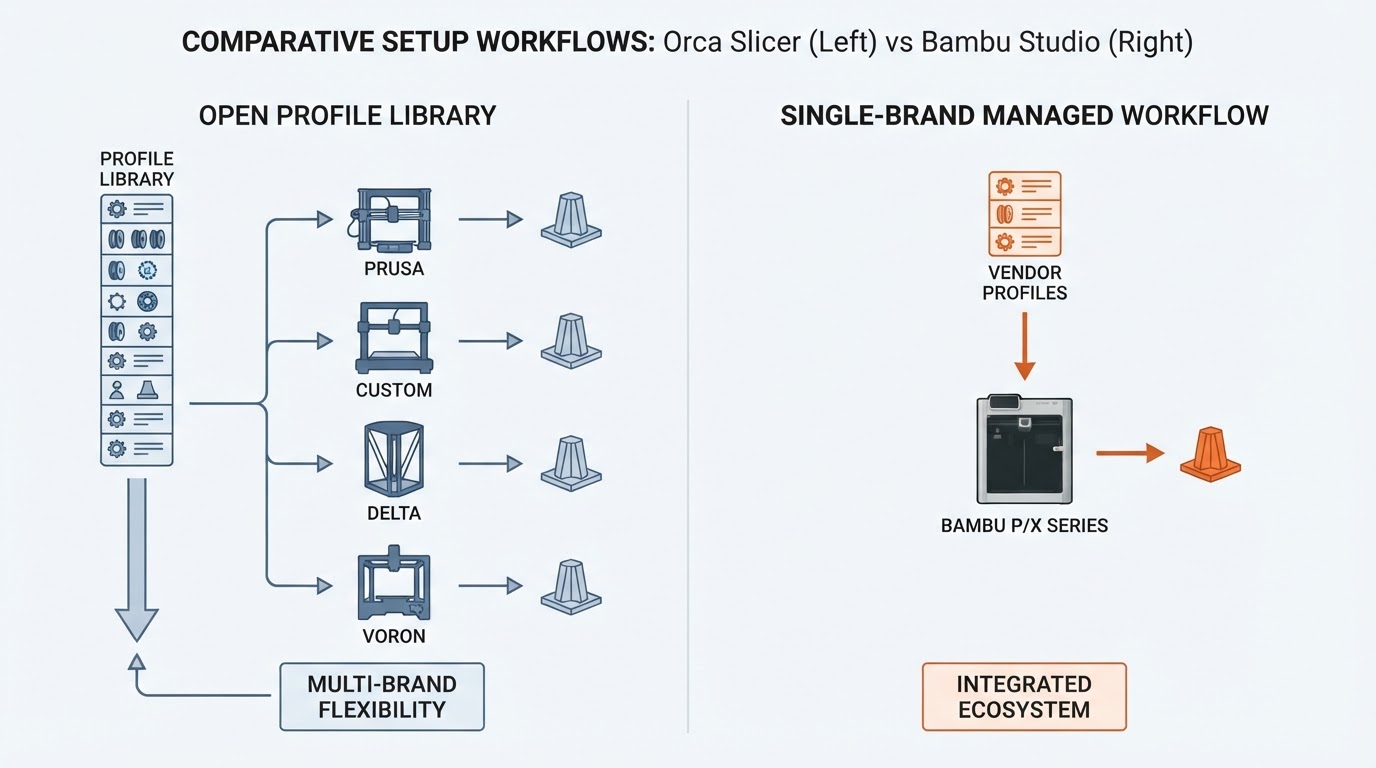
If your bench has more than one brand on it, Orca Slicer is the simpler install, and Bambu Studio is built around Bambu Lab machines.
Orca Slicer ships with hundreds of preloaded machine profiles spanning Bambu Lab, Prusa (i3 MK3, MK4, Core One, Mini, XL), Creality (Ender, K-series, CR-10, CR-M4), Voron (V0, 2.4, Trident), VzBot, RatRig, Anycubic, Elegoo, Sovol, Qidi, Snapmaker and the official Orca-Flashforge fork, plus generic Klipper and Marlin templates and a custom-printer workflow for anything that is not listed.
One install can drive a mixed fleet; the documented example is an X1C, a Voron 2.4 and a Sovol SV08 from the same profile library. Profile bundles import and export between installs, and the recommended practice is to review a preset diff before applying someone else's bundle globally.
For maintenance, keep a Stock profile next to a Tuned profile and record hardware modifications in the profile notes, so a nozzle change or a new spool does not silently overwrite a known-good baseline.
Workflow, flexibility, and network printing
Orca Slicer gives you more exposed control and a cloud-free network model; Bambu Studio stays inside the managed Bambu ecosystem.
Network printing shows the split most clearly. Orca Slicer documents first-class OctoPrint, PrusaLink and Klipper integration (Moonraker, Mainsail, Fluidd) with API-key authentication, plus Bambu printers over LAN with Developer Mode enabled, including the January 2025 Authorization Control change. Stealth Mode is documented as zero outbound calls to Bambu servers, which matters on a shared or monitored network.
That privacy and control comes with honest trade-offs on the Bambu path. Since the 2025 changes, AMS RFID auto-read is gone and slot assignment is manual, and live camera access is LAN-only. For those two conveniences, Bambu Studio is still the simpler path.
G-code access goes deeper in Orca Slicer: start, end, toolchange and layer-change templates with slicer placeholders such as first_layer_temperature, post-processing script hooks, Arc Fitting for smoother motion on supporting firmware, and verbose G-code with feature comments that Klipper macros can key off.
Multi-material workflows cover Bambu AMS and AMS Lite, Prusa MMU3, BoxTurtle, Tradrack and generic multi-extruder setups, with per-pair flush calibration, wipe-into-infill and wipe-into-object options that cut purge waste, and manual wipe tower placement documented as an Orca Slicer-only feature.
Which to choose for whom
Pick the slicer that matches your fleet and how much tuning time you are willing to spend, not the one with the longer feature list.
- One Bambu Lab printer, minimal setup: Bambu Studio, because the managed workflow is the whole point.
- A Bambu Lab printer plus a wish for offline control: Orca Slicer over LAN with Developer Mode, accepting manual AMS slot assignment and LAN-only camera access.
- A mixed-brand bench: Orca Slicer, because one profile library covers every machine on the bench.
- A Klipper or Voron build: Orca Slicer, where the Cornering / Junction Deviation and VFA / Input Shaping tests target the ringing and acceleration problems these machines hit.
- A small print shop running the same parts repeatedly: Orca Slicer, using per-spool filament presets, Max Volumetric Speed caps and the Stock versus Tuned profile pattern to keep results repeatable.
- A first printer with no interest in tuning yet: Bambu Studio now, then revisit if you add another brand.
If you are still undecided, slice the same model in both slicers and print both before moving your profiles across; the workflow difference shows up faster in one test print than in any feature list.
FAQ
Does Orca Slicer work with Bambu Lab printers?
Yes. The documented route is LAN mode with Developer Mode enabled, and it comes with caveats worth knowing before you switch: AMS RFID auto-read becomes manual slot assignment, and live camera access is LAN-only.
Do I lose Bambu features if I switch?
Some Bambu conveniences, yes, and the documented examples are AMS RFID auto-read and cloud-side camera access. In exchange you get Stealth Mode, the eight-test calibration menu and the wider parameter surface.
Which slicer has more calibration tools?
Orca Slicer, by the documented count of eight guided tests against two in Bambu Studio, with Bambu's two limited to Bambu Lab printers.
Can I keep both slicers installed?
Yes, and it is a reasonable way to decide. Slice one model in each, print both, and compare the workflow and the result before moving your profiles across.
Is the extra tuning worth it on a single printer?
Only if you are chasing repeatability across spools or materials. On one printer with one filament, the managed path is usually enough; the calibration menu pays off once you change filament brands, nozzles or machines.
What should a mixed-brand fleet standardize on?
Orca Slicer, with one install, one profile library and one calibration routine for every machine on the bench, and Bambu-specific work handled over LAN.